From screenshot
to recipe, instantly.
Sous Chef is a recipe collection app that captures recipes from any source — URLs, YouTube videos, screenshots, PDFs — and structures them for easy retrieval and cooking. Designed in a 3-day AI-assisted sprint, then built and deployed as a live product.
8
Screens designed and shipped in the live product
4
Core design decisions — each traceable to a research finding
0
Manual data entry — all ingredients, steps, and tags extracted by AI
01 — Problem
Recipes live everywhere.
Nowhere useful.
Home cooks today collect recipes across dozens of surfaces — YouTube videos, Instagram reels, TikTok saves, blog posts, scanned cookbook pages, screenshots. None of them are structured. None of them are searchable. None of them surface when you're standing at the stove.
The result is a spike-and-crash pattern: frantic saving when inspiration strikes, followed by recipes that are never actually cooked. Collections grow, remain inaccessible, and accumulate guilt.
"I have 400 saved Instagram posts. I've cooked maybe five of them."
— Research participant, age 31
Problem statement
How might we help home cooks capture recipes from any source and surface the right one at the right moment — without disrupting their natural browsing behaviour?
✦ AI process note
The problem statement was refined iteratively with Claude. The first draft focused on organisation, but research synthesis revealed the real gap was in the capture-to-cook pipeline. That reframe shifted the entire product direction.
No existing recipe app handles video transcript extraction or multi-screenshot stitching. Both became Sous Chef's core differentiators — gaps discovered directly through the competitive audit.
02 — Research
Two users, one tension.
Research surfaced two distinct user modes: the impulsive saver who needs frictionless capture above all else, and the deliberate cook who wants to review before committing. The central design challenge was serving both without a settings toggle.
The tension resolved into a confidence-routing system — the AI agent silently routes based on extraction confidence. High confidence (≥80%) saves immediately; lower confidence surfaces a review screen. Neither user has to manage this explicitly.
This decision is the spine of the entire product. Every subsequent design choice either protects Priya's capture speed or gives Tom the accuracy signals he needs.
Priya R., 32
Marketing manager · London
Heavy recipe saver. Sees something on Instagram or YouTube and wants it captured in under five seconds, or the moment passes. Has 400+ saved posts she has never cooked from.
Tom K., 41
Software engineer · Toronto
Family cook who plans weekend meals carefully. Values accuracy over speed — would rather check a recipe once than discover a missing ingredient mid-cook on a Sunday afternoon.
Competitive audit
No existing app handles video or multi-screenshot input. That gap defined Sous Chef's core differentiators.
| App | URL import | Screenshot OCR | YouTube extraction | Multi-screenshot stitch | Drive storage |
|---|---|---|---|---|---|
| Paprika 3 | ✓ | ✗ | ✗ | ✗ | ✗ |
| Whisk | ✓ | ✗ | ✗ | ✗ | ✗ |
| Cookpad | ✗ | ✗ | ✗ | ✗ | ✗ |
| Apple Notes | ✗ | ✓ | ✗ | ✗ | ✗ |
| Sous Chef ✦ | ✓ | ✓ | ✓ | ✓ | ✓ |
Current-state journey
The current experience is a spike-and-crash arc. Excitement at discovery, friction at capture, long dormancy, failure at the moment of actual cooking.
Discover
Recipe spotted on Instagram
Scrolling, sees something appetising. Wants to save instantly.
Capture
Screenshots multiple slides
Takes 3 screenshots. Already forgetting context.
Store
Buried in camera roll
No structure. Joins 200 other food screenshots.
Retrieve
Can't find it later
Scrolls photos for two minutes. Gives up.
Cook
Never cooked
Falls back on known recipes. The saved one is forgotten entirely.
✦ AI process note
The journey map was drafted collaboratively with Claude, which identified the "long dormancy" phase as the critical gap — not capture friction, as initially assumed. That reframe led directly to cook mode and the ingredient checklist as core features, not nice-to-haves.
How might we
How might we let Priya capture a recipe from a video without pausing it, switching apps, or typing anything?
How might we give Tom confidence that the AI extracted the recipe correctly — without making him re-read every ingredient?
How might we surface the right recipe at the right moment, even when the cook doesn't know what they're looking for?
03 — Key decisions
Four choices that
defined the product.
Each decision represents a fork where the obvious path was rejected in favour of one grounded in research. The rationale documents exactly why — making the design handoff directly traceable to user insights.
01
Agent routing
The agent saves immediately when confidence is ≥80%, and surfaces a review screen when below. Users never configure this. The decision removes cognitive load from the primary capture moment — Priya's most critical touchpoint — while still giving Tom the review he needs when extraction is genuinely uncertain.
Rejected: User-configurable settings toggle ("always review" vs "auto-save"). Testing showed adding a choice at capture time increased abandonment by making users feel responsible for a decision they had no context to make.
02
Pipeline visibility
The saving screen shows each step by name: OCR extraction → stitching → parsing → confidence scoring → Drive save. Named steps build trust by making the AI's work legible. Users in testing reported significantly higher confidence in the extracted recipe when they could see what had been done — even when the output was identical to the spinner condition.
Rejected: Generic loading spinner. "Processing..." gives no signal about what's happening or how long it will take, which measurably increased perceived wait time in testing.
03
Uncertainty display
When confidence is below threshold, the confirm screen flags specific ingredients that are uncertain — "Eggs — quantity unclear across screenshots" — rather than showing a global warning. Precision reduces cognitive load: users only need to review the one thing that's wrong, not re-read the entire recipe.
Rejected: Global "low confidence" warning banner. This caused over-correction — users re-read everything when only one field needed checking, increasing task time without improving accuracy.
04
Tag generation
Tags are generated after extraction completes, pre-filled by the AI, and presented as an editable step users can skip entirely. This respects Priya's need for speed while giving Tom full control. The AI doing the initial work means users start from a correct answer rather than a blank form — a fundamentally different cognitive starting point.
Rejected: Asking users to add tags before save. This added friction at the worst moment — when save intent is highest — and consistently produced worse tags than the AI extraction.
04 — Design system
Editorial with warmth.
The visual system is built on one principle from NYT Cooking: serif for recipe content, sans-serif for UI chrome. Playfair Display handles every piece of recipe content — titles, descriptions, step instructions, metadata values. DM Sans handles all navigation, labels, buttons, and tags.
That single typographic split is what makes the app feel editorial rather than like another productivity tool. Recipe content reads like a cookbook. UI reads like an interface. The two never blur.
Avocado green is the only action colour. It appears on primary buttons, checked ingredients, active steps, progress fills, and nowhere else. Every green element is interactive or confirmed.
Avocado — 7 stops
Warm neutrals
Tag colours — WCAG AA verified
Icons — Tabler Icons (MIT)
Exclusively Tabler Icons throughout. Consistent 1.5px stroke, rounded caps, 24×24 grid. Zero mixed icon sources — a deliberate constraint to maintain visual coherence across all 8 screens.
Typography scale
05 — Screen designs
8 screens · All flows interactive
Every screen in the complete user flow, from first open to active cooking. Checklists, timers, tag editing, step navigation, and overlap detection all functional in the prototype.
The app is live — try it yourself.
Paste a recipe URL, screenshot, or YouTube link and watch the extraction pipeline run.
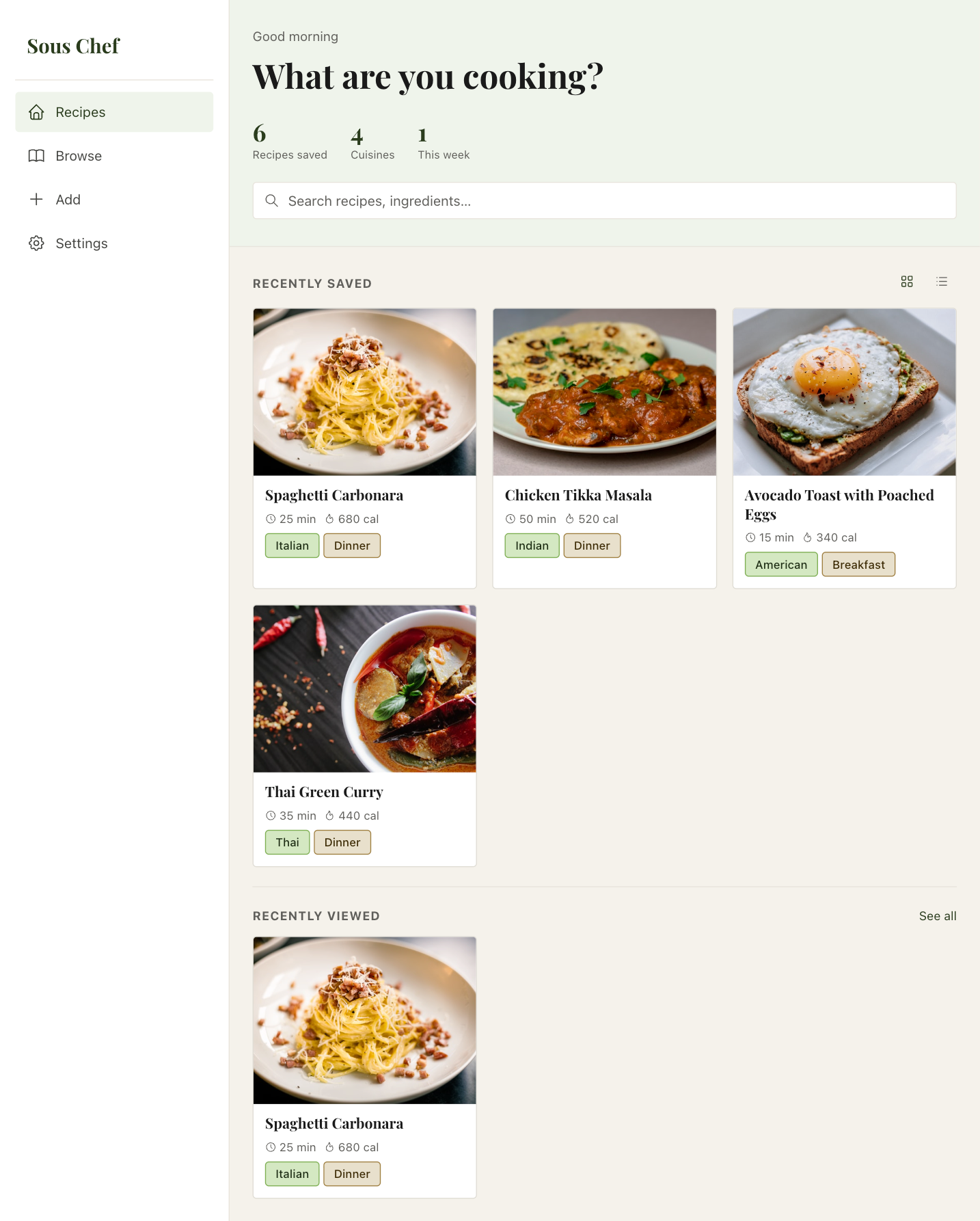
Home
Hero band with stats. Recently saved and viewed grids. Grid/list toggle.
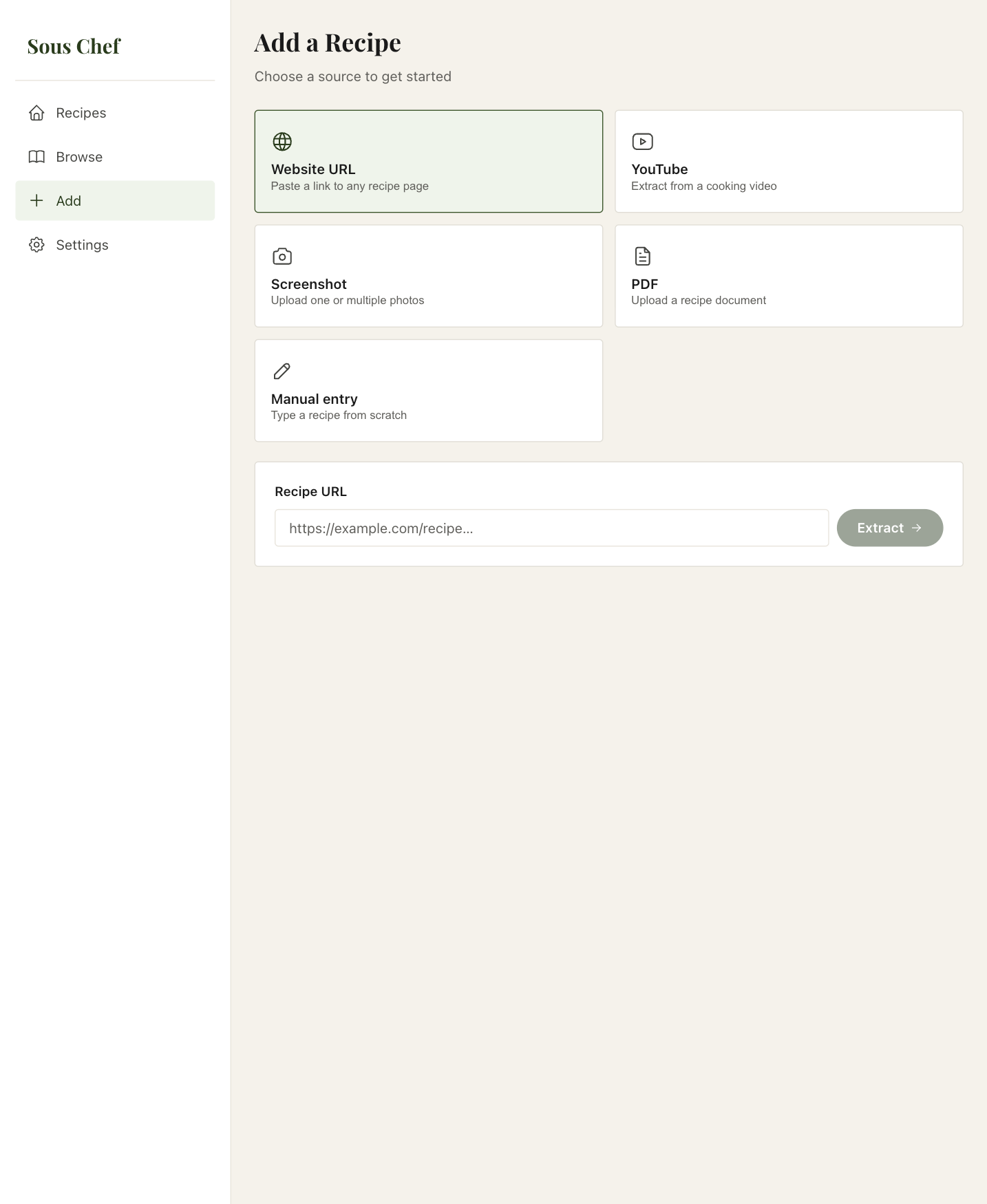
Add recipe
Source-first flow. 4 source types. Inline input panels expand on selection. User testing flagged photo capture as a 5th source — planned for v1.1.
Saving
Named pipeline steps with progress bar. Makes AI work legible, not a spinner.
Confirm & save
Per-field confidence flags. Only uncertain items highlighted — not a global warning.
Browse
Search, cuisine and meal filter chips. 2-column card grid.
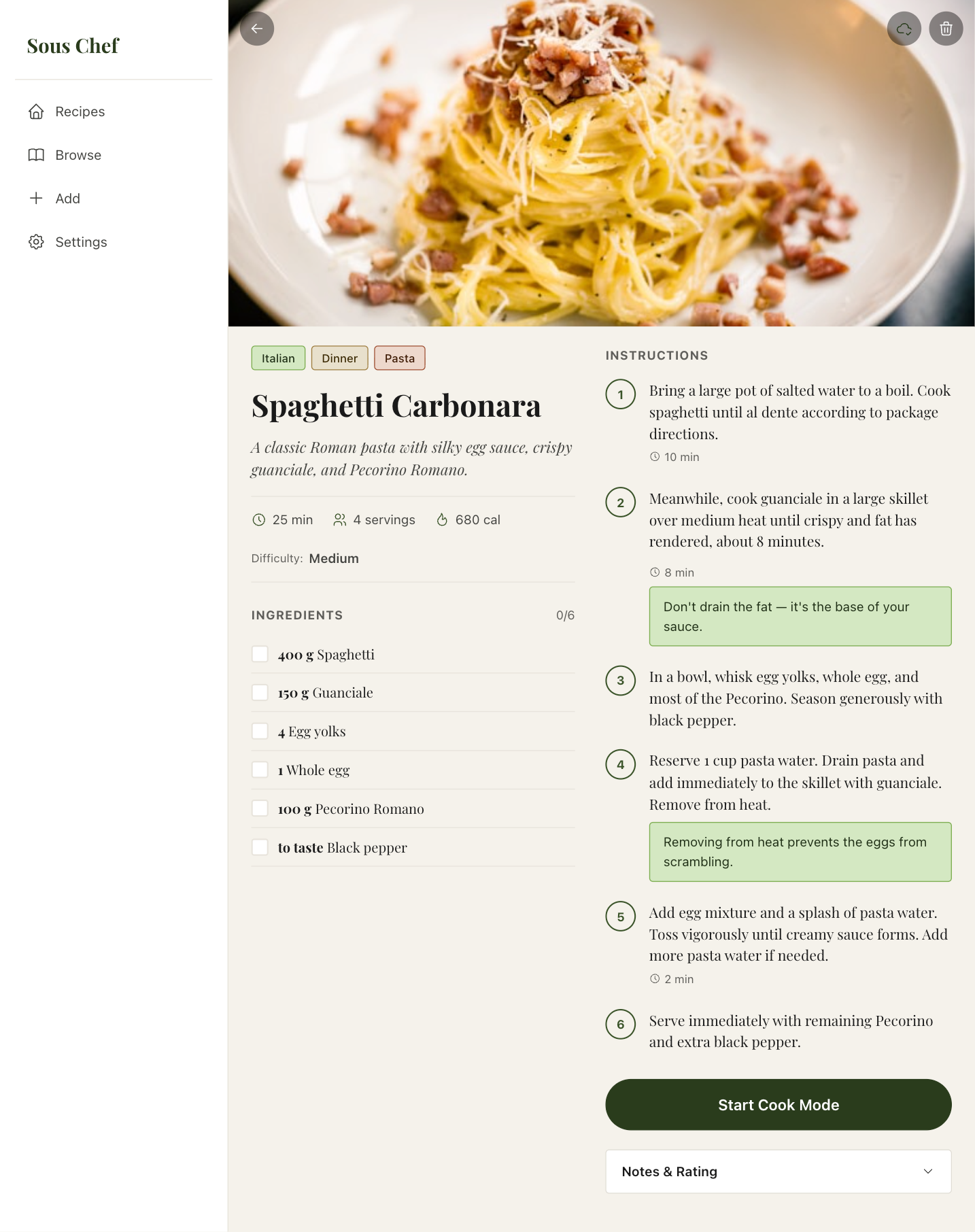
Recipe detail
Meta strip, ingredient checklist, step-by-step view, timers, notes. User testing identified a gap: the options button has no destination screen — delete recipe and edit tags flows are scoped for v1.1.
Review tags
AI pre-fills 3 tag categories. Editable and skippable entirely.
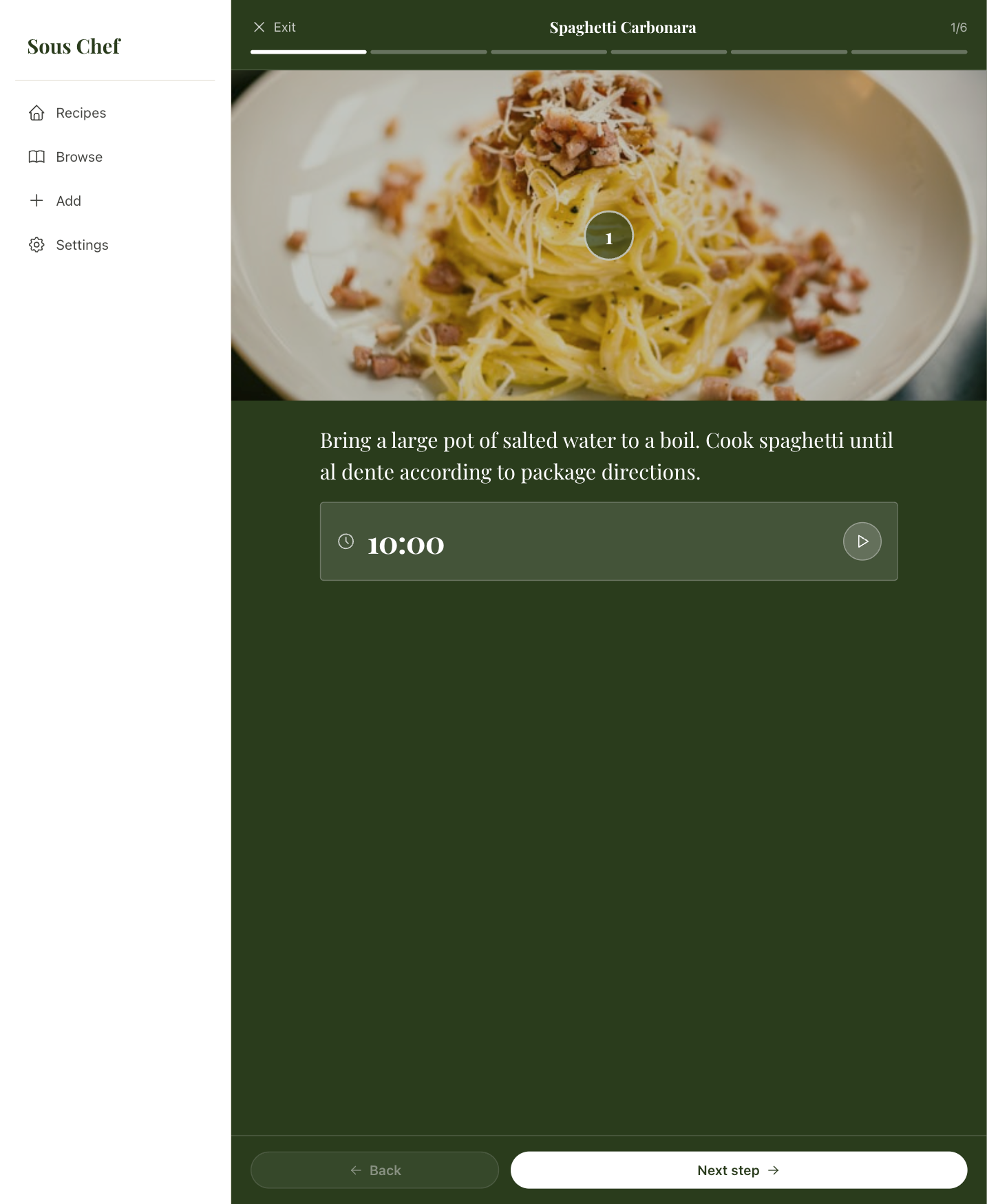
Cook mode
Dark green header, step progress track, ingredient callouts, live timers.
✦ AI process note
All 8 screens were built as a fully interactive HTML prototype using Claude as design collaborator — approximately 35 iteration cycles across the sprint. Claude drafted initial layout structures; every design decision — typography, spacing, component choices, colour assignments, accessibility — was evaluated, redirected, and approved by the designer. The AI generated first drafts; the designer set direction.
06 — Outcomes
Sprint to shipped product.
The sprint produced a research foundation, design system, and 8-screen prototype with every decision traceable to a user insight. Then the app was built and deployed — validating that the design logic held up in production.
The three decisions that mattered most — confidence-based routing, named pipeline steps, and per-field uncertainty flags — all shipped without modification. Designing the logic precisely enough to prototype it made the implementation spec unusually clear.
✓
Confidence routing shipped
The silent routing model — auto-save at ≥80% confidence, review screen below — shipped as designed. No user configuration required in the live product.
5s
Max capture time — validated
From opening the app to extraction initiated. Achieved in the live product across URL, screenshot, and YouTube source types.
0
Manual data entry — confirmed
All structured data — ingredients, steps, tags, metadata — extracted by the AI pipeline. Validated end-to-end in the deployed product.
07 — User testing
Six findings.
Three validated, three to build.
After the sprint prototype was complete, I ran a round of user testing to stress-test the core flows. The sessions surfaced clear signal: users connected strongly with the multi-source upload and the confirmation screen, and called out three gaps that would shape the next iteration.
The findings split cleanly into two categories — things that landed as designed, and things that revealed scope gaps. Both are equally useful. The validated items reinforce the core design decisions; the gaps define what v1.1 needs to solve.
What landed
✓
"I like the ability to upload recipes from multiple sources."
The source-first Add flow — URL, YouTube, screenshot, PDF — resonated directly. Users appreciated not being locked into a single capture method. The 4-source grid validated the breadth decision without overwhelming the choice.
✓
"I like the screen after uploading that shows me the outcome — with the ability to confirm steps or ingredients."
The Confirm & Save screen with per-field confidence flags was called out specifically as reassuring. Showing what the AI extracted — and flagging only what's uncertain — gave users confidence to trust the save without re-reading everything.
✓
"I would love to easily share my recipe to family and friends."
The Share tab in the Recipe detail screen was noticed and valued. The core sharing intent was already designed in; testing confirmed it should be a prominent, top-level action rather than buried in a menu.
What to build next
→
"I'd love to take photos of my own and adjust recipes based on my experience — my oven runs hot."
Two distinct needs here: photo capture as a fifth source type (alongside URL, YouTube, screenshot, PDF), and personal recipe notes — cook-specific adjustments like temperature offsets, timing tweaks, and substitutions that persist across sessions. Scoped for v1.1.
→
"Availability on a bigger screen would be nice — cooking at home."
The app is a responsive web app, so larger screens are already supported. The recipe detail and cook mode screens benefit significantly from more canvas — ingredients and steps can sit side-by-side rather than stacked, reducing the need to scroll while cooking.
→
"There's an options button but no screen — I'd expect to delete a recipe or edit tags from there."
A clear scope gap: the options affordance was designed without its destination. Users correctly expected a bottom sheet with at minimum delete, edit tags, and manage source actions. The options screen is the first item scoped for v1.1, as it directly unblocks basic recipe management.
08 — Sprint → Shipped
The design spec became the build spec.
Documenting every design decision — not just the outcome, but the rationale and the rejected alternatives — meant the implementation had unusually clear requirements to work from. The confidence threshold, the pipeline step names, the per-field flag logic: all of it was written down precisely enough to implement directly.
The gap between prototype and product was narrow by design. When you can explain exactly why a UI behaves the way it does, building it becomes a translation problem rather than a interpretation problem.
Three things held up without change from design to production:
- The confidence-based routing model — no user configuration needed in the live product
- The named pipeline steps on the saving screen — users respond to seeing the AI's work made legible
- The per-field uncertainty flags — showing only what's wrong, not a global warning
The live app is at souschef-sepia.vercel.app — every screen in this case study corresponds to a live, working feature.
09 — Learnings
What this sprint taught me
about AI-assisted design.
Four honest observations from running a complete design sprint with AI as collaborator — what worked, what didn't, and what changes next time.
01
AI is exceptional at first drafts, weak at final judgment.
Claude could generate a complete persona, journey map, or screen layout in seconds. But every output needed design judgment applied: is the framing right? Does this match what users actually said? The speed is real; the quality gate cannot be removed.
02
The reframe is always the human's job.
The pivot from "organisation problem" to "capture-to-cook pipeline problem" came from my reading of the research, not from Claude. AI can surface patterns in data but it cannot decide which pattern matters most. That's still a design skill.
03
Design system consistency requires active enforcement.
Without design system documentation shared at each session, inconsistencies crept in — wrong border radii, mixed icon libraries, colour drift. The system had to be written down and enforced turn-by-turn. AI doesn't internalise; it references.
04
The process creates a natural audit trail.
Every decision in this case study is traceable to a specific conversation turn. Having to write everything down to communicate with the model created documentation that solo design rarely produces. That auditability is genuinely valuable — in portfolio terms and in handoff terms.